
How to sell your own product with EntPay
EntPay is not a store operated by Entcoin. It is a payment and delivery protocol that lets an independent merchant sell a digital product or service for ENT while the customer keeps control of the wallet and final approval.
A merchant can run the product on a laptop, VPS, private cloud, or container platform. The product does not need to be merged into Entcoin, deployed on an Entcoin node, or published in the Entcoin GitHub repository.
This guide follows one concrete example: a merchant builds an image-generation service, publishes it on the web, and a user buys a generated photograph for 0.001 ENT.
What can a merchant sell?
Any bounded digital result that can be produced after payment is a reasonable starting point:
- an image, video, audio file, or document conversion;
- a data lookup, market report, or blockchain analysis;
- an API call, model inference, or compute job;
- an MCP tool result or one-time access token;
- a downloadable file or another verifiable digital artifact.
The merchant owns the product logic, pricing, infrastructure, support, and legal obligations. EntPay supplies the signed Invoice and Receipt contract, exact on-chain payment verification, confirmation tracking, replay protection, and authorized artifact delivery.
Merchant path: from product idea to a live service
1. Implement one product
Create a separate merchant project and implement the public Go interface:
type Product interface {
    Descriptor() ProductDescriptor
    Validate(context.Context, json.RawMessage) error
    Fulfill(context.Context, FulfillmentRequest) (Fulfillment, error)
}
Descriptor tells Agents what the product is, how much it costs in atoms, how many confirmations it requires, and which input fields it accepts.
Validate rejects malformed or unsupported input before an Invoice is created. It should be fast and must not call a paid provider.
Fulfill runs only after the Gateway verifies the exact Entcoin payment and confirmation count. It should use the stable Invoice ID as an idempotency key whenever an upstream provider supports one, so retries cannot charge the merchant twice.
For the generated-photo example, the merchant validates the prompt, calls its image provider after payment, verifies the returned media type, dimensions, and byte limit, and returns the JPEG as an artifact.
2. Register products with the EntPay Gateway
gateway, err := entpay.NewGateway(entpay.MerchantConfig{
    MerchantAddress:      merchantAddress,
    SigningKey:           signingKey,
    NodeURL:              validatingNode,
    DatabasePath:         dataDirectory + "/entpay.db",
    FulfillmentDirectory: dataDirectory + "/fulfillments",
    Products:             []entpay.Product{photoProduct, reportProduct},
})
The Gateway provides the merchant workspace and protocol endpoints, signs input-bound Invoices, tracks SQLite delivery jobs, prevents transaction reuse, checks one exact payment output, waits for confirmations, signs Receipts, and authorizes artifact downloads.
The receiving wallet private key is not required. The merchant service needs only a public receiving address. Invoice signing uses a separate EntPay Ed25519 key.
3. Deploy it as an independent service
Run the binary under a dedicated service account, bind it to loopback, and expose it through an HTTPS reverse proxy. Keep the SQLite database and fulfillment directory in a persistent, access-restricted data directory.
Inject these values at runtime with systemd credentials or a secret manager:
- public ENT receiving address;
- EntPay Invoice/Receipt signing key;
- validating Entcoin node URL;
- model or upstream API URL and key, when required.
Do not place production keys, wallet seeds, claim capabilities, databases, logs, prompts, provider responses, generated files, server inventory, or private endpoints in Git, including a private Git repository. Do not pass secrets as command-line arguments because process arguments are observable.
Before opening the service to users, check /healthz and /v1/info, back up the database and artifact directory, and complete one low-value paid purchase for every product.
4. Tell users where the service is
Today, EntPay does not pretend to have a global decentralized marketplace. A merchant publishes its HTTPS service URL through its own website, documentation, community post, X account, Agent configuration, or a curated directory.
Humans discover the service through that link. Agents read the same merchant's GET /v1/info response to discover product IDs, descriptions, prices, confirmation requirements, input fields, capabilities, and the merchant signing public key.
The important boundary is that discovery is not trust. Before payment, the local Agent independently verifies the advertised product, signed Invoice, merchant address, exact price, input hash, expiry, network, and the user's hard spending limit.
User path: discover, approve, pay, and use the result
1. Start the local Agent once
Download EntPay from the Entcoin release and start the local confirmation application with a dedicated low-balance wallet:
entpay agent-ui \
  --data /path/to/Entropy/mainnet-v1 \
  --wallet ent1... \
  --max-amount 0.01000000 \
  --artifacts ~/Downloads/EntPay
It listens only on 127.0.0.1:47831. The wallet seed and private key remain in the local Entcoin data directory.
2. Open a merchant and create an Invoice
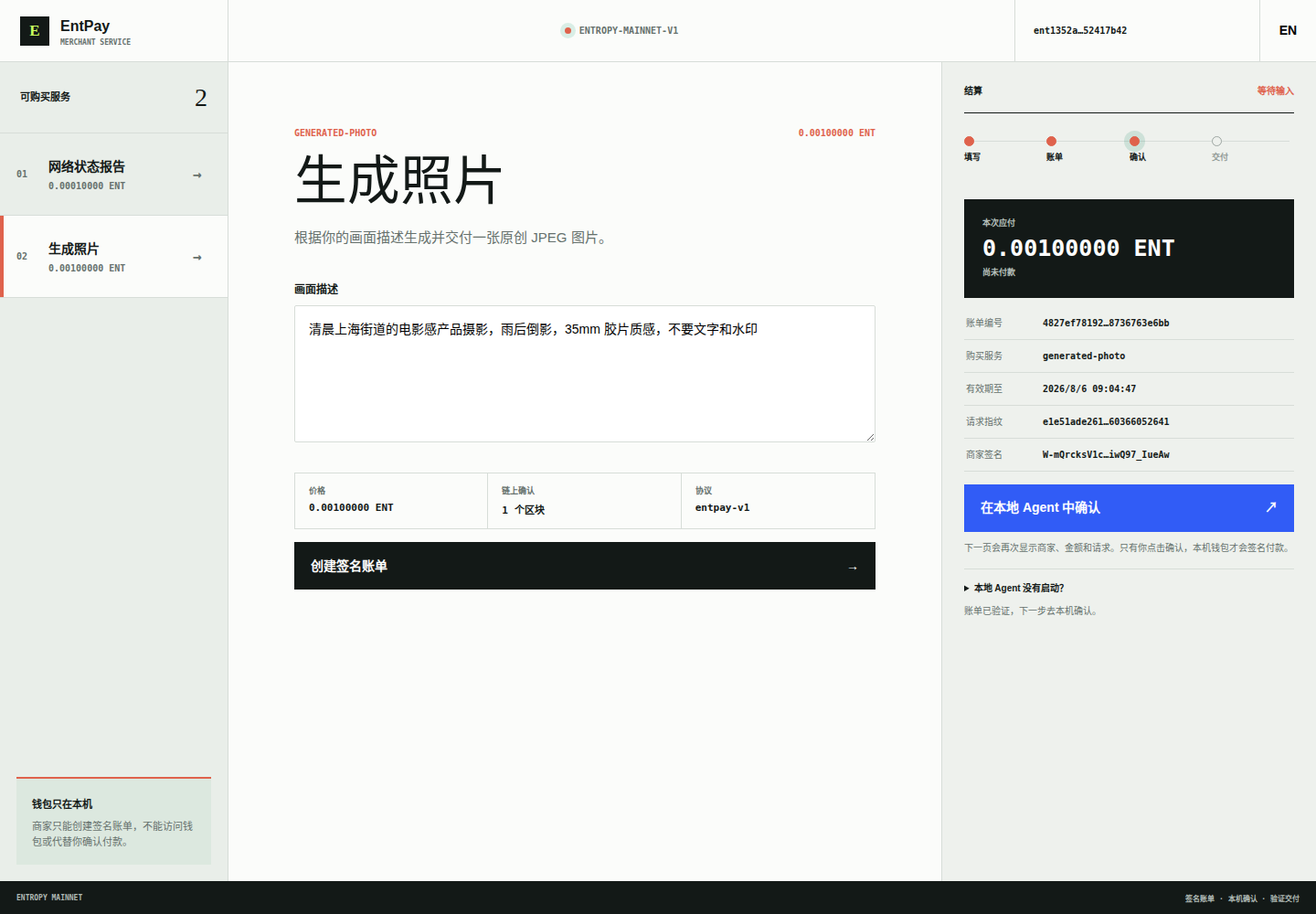
The user follows the merchant's HTTPS link, selects a product, fills in the request, and chooses Create signed invoice. This does not pay anything. It only asks the merchant to sign a quote bound to the exact input.
The page then shows the amount, service ID, expiry, request hash, merchant signature, and a clear NOT PAID state. The user continues with Confirm in local Agent.
3. Review locally and make the final decision
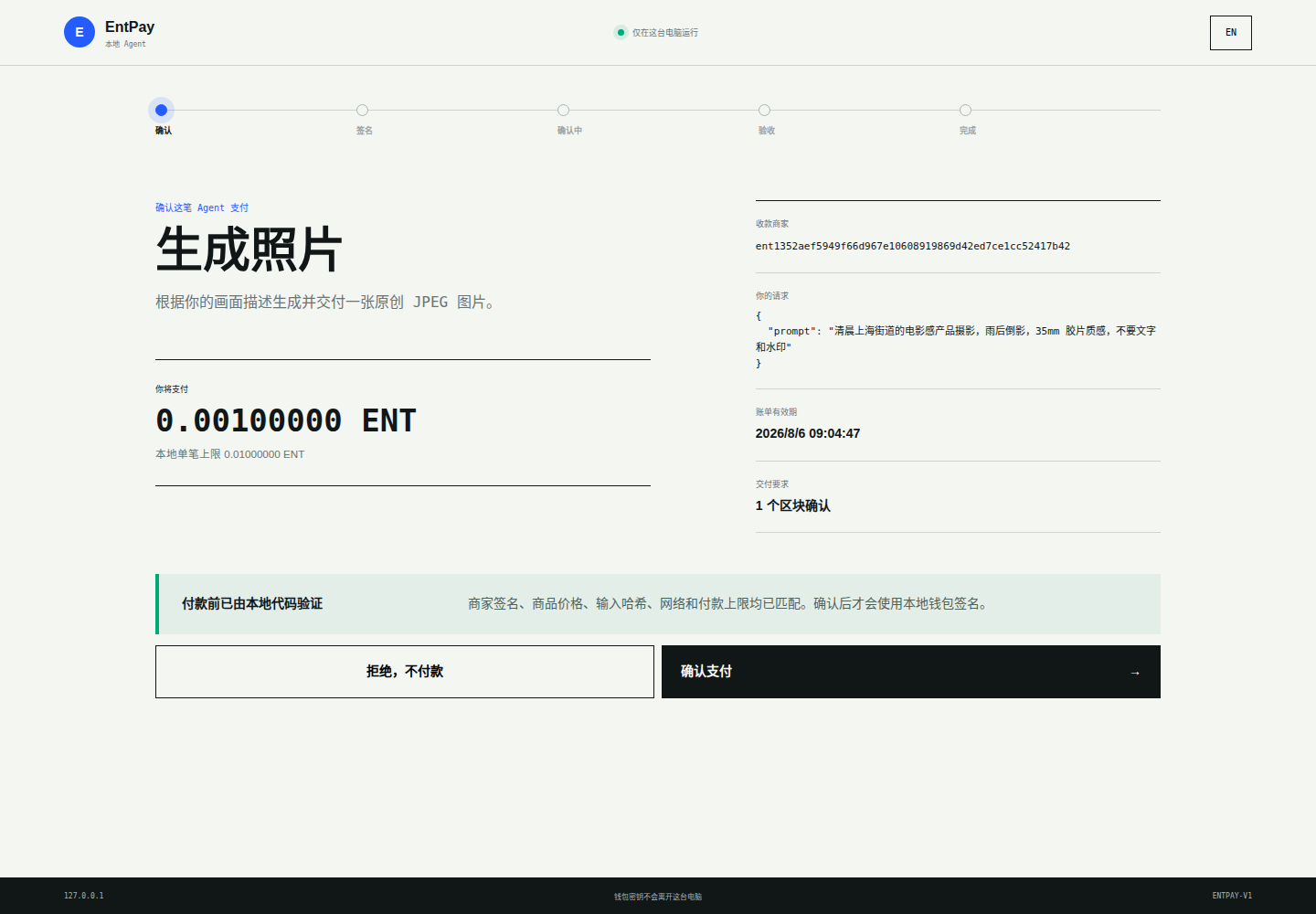
The local Agent fetches merchant metadata again and verifies deterministic facts before showing the approval page. The user can reject without creating any transaction, or approve after reviewing the merchant, full request, price, local maximum, expiry, and required confirmations.
Approval makes the local wallet sign and broadcast an ordinary ENT transaction. The merchant cannot click this button, access the wallet, or bypass the user's limit.
4. Receive a verified delivery
The merchant verifies the exact payment output and waits for its configured confirmations before calling the product. The Agent then checks the signed Receipt, transaction, original input, payload hash, and optional artifact hash before saving the result.
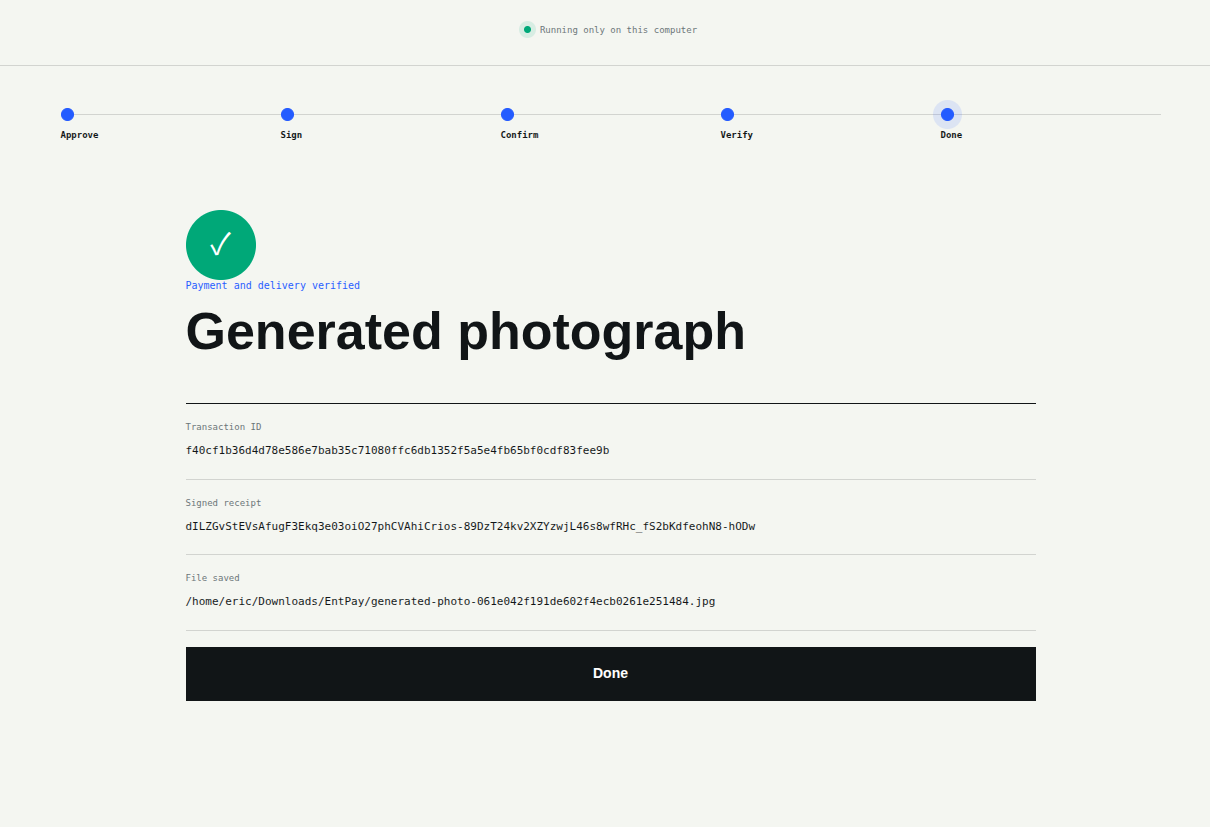
The customer can now use the result like any ordinary local file or JSON response. In this real purchase, the delivered JPEG was saved under ~/Downloads/EntPay/ and independently matched the merchant's stored artifact byte for byte.

What the complete flow achieves
merchant publishes HTTPS URL
  -> user or Agent reads /v1/info
  -> merchant signs an input-bound Invoice
  -> local Agent verifies terms and asks the user
  -> local wallet pays on-chain
  -> merchant verifies exact output + confirmations
  -> product fulfills once
  -> merchant signs Receipt and delivers result
  -> local Agent verifies and saves it
Entcoin provides the standard. The merchant owns the product and deployment. The user owns the wallet and final decision. Each side keeps the responsibility it can actually control.
Start here:
- EntPay and live merchant workspace: https://entcoin.xyz/entpay/
- Public SDK and protocol documentation: https://github.com/HONG-LOU/entcoin/blob/v1.5.1/docs/entpay.md
- Entcoin v1.5.1 downloads: https://github.com/HONG-LOU/entcoin/releases/tag/v1.5.1
- Real
0.001 ENTpurchase record: https://community.entcoin.xyz/t/8
如何使用 EntPay 出售自己的产品
EntPay 不是 Entcoin 官方经营的商店。它是一套支付与交付协议,让独立商家可以用 ENT 出售数字产品或服务,同时让用户始终掌握钱包和最终确认权。
商家可以把产品运行在自己的电脑、VPS、私有云或容器平台。产品不需要合并进 Entcoin,不需要部署在 Entcoin 节点里,也不需要放进 Entcoin 的 GitHub 仓库。
下面用一个真实场景说明:商家构建图片生成服务,在网页上发布;用户支付 0.001 ENT,得到一张经过验证的生成照片。
商家可以卖什么?
适合第一批接入的是付款后能够产生明确数字结果的服务:
- 图片、视频、音频、文档转换;
- 数据查询、市场报告、区块链分析;
- API 调用、模型推理、算力任务;
- MCP 工具结果或一次性访问 token;
- 下载文件或其他可验证的数字产物。
商家负责产品逻辑、价格、基础设施、客服和法律责任。EntPay 提供签名 Invoice/Receipt 合约、精确链上付款验证、确认跟踪、交易重放保护和授权文件交付。
商家路线:从产品想法到正式上线
1. 实现一个 Product
在商家自己的独立项目中实现公共 Go 接口:
type Product interface {
    Descriptor() ProductDescriptor
    Validate(context.Context, json.RawMessage) error
    Fulfill(context.Context, FulfillmentRequest) (Fulfillment, error)
}
Descriptor 声明商品是什么、原子单位价格、确认数和输入字段。
Validate 在创建 Invoice 前拒绝格式错误或不支持的输入。它应当快速执行,不能在这一步调用收费的上游服务。
Fulfill 只有在 Gateway 验证准确付款和确认数后才运行。上游支持幂等键时,应使用稳定的 Invoice ID,避免重试让商家被重复扣费。
在生成照片示例中,商家先验证 prompt,付款确认后才调用图片模型,再检查返回文件的媒体类型、尺寸和字节上限,最后把 JPEG 作为 artifact 交付。
2. 把 Product 注册到 EntPay Gateway
gateway, err := entpay.NewGateway(entpay.MerchantConfig{
    MerchantAddress:      merchantAddress,
    SigningKey:           signingKey,
    NodeURL:              validatingNode,
    DatabasePath:         dataDirectory + "/entpay.db",
    FulfillmentDirectory: dataDirectory + "/fulfillments",
    Products:             []entpay.Product{photoProduct, reportProduct},
})
Gateway 会提供商家工作台和协议接口,签发与输入绑定的 Invoice,管理 SQLite 交付任务,阻止交易重复使用,核对准确收款 output,等待确认,签发 Receipt,并授权下载 artifact。
商家服务不需要收款钱包私钥,只需要公开收款地址。Invoice/Receipt 使用独立的 EntPay Ed25519 密钥签名。
3. 独立部署商家服务
使用专用系统账户运行二进制,只监听 loopback,再通过 HTTPS 反向代理对外提供服务。SQLite 数据库和履约目录应放在持久化、限制访问的数据目录中。
通过 systemd credentials 或 secret manager 在运行时注入:
- ENT 公开收款地址;
- EntPay Invoice/Receipt 签名密钥;
- 用于验证付款的 Entcoin 节点 URL;
- 所需的模型或上游 API URL 和 key。
不要把生产密钥、钱包 seed、claim capability、数据库、日志、prompt、模型响应、生成文件、服务器清单或私有 endpoint 放进 Git,即使是 Private 仓库也不应该。不要把 secret 放在命令行参数里,因为进程参数可以被读取。
对外开放前,检查 /healthz 和 /v1/info,备份数据库与 artifact 目录,并为每个商品完成一笔低金额真实购买。
4. 告诉用户去哪里找到服务
EntPay 目前不会假装已经拥有一个“全球去中心化商店”。商家通过自己的官网、文档、社区帖子、X 账号、Agent 配置或人工维护的目录发布 HTTPS 服务地址。
人通过链接找到商家;Agent 读取同一商家的 GET /v1/info,发现商品 ID、描述、价格、确认数、输入字段、能力和商家签名公钥。
发现不等于信任。付款前,本机 Agent 仍会独立验证商品、签名 Invoice、商家地址、准确价格、输入哈希、有效期、网络和用户设置的硬支付上限。
用户路线:发现、确认、付款和使用结果
1. 启动一次本机 Agent
从 Entcoin Release 下载 EntPay,使用一个低余额专用钱包启动本机确认应用:
entpay agent-ui \
  --data /path/to/Entropy/mainnet-v1 \
  --wallet ent1... \
  --max-amount 0.01000000 \
  --artifacts ~/Downloads/EntPay
它只监听 127.0.0.1:47831。钱包 seed 和私钥始终保存在本机 Entcoin 数据目录中。
2. 打开商家并创建 Invoice
用户打开商家的 HTTPS 链接,选择商品、填写需求,然后点击 创建签名账单。这一步不会付款,只是让商家签发一张绑定准确输入的报价。
页面随后显示金额、服务 ID、有效期、请求哈希、商家签名和明确的“尚未付款”状态。用户再点击 在本机 Agent 中确认。
3. 在本机核对并作最终决定
本机 Agent 会再次获取商家信息,完成确定性验证后才展示确认页。用户可以拒绝且不创建任何交易,也可以在核对商家、完整请求、金额、本地上限、有效期和确认数后批准。
批准后,本机钱包才签名并广播普通 ENT 交易。商家不能替用户点击确认、读取钱包或绕过本地限额。
4. 收到经过验证的交付
商家核对准确付款 output 并等待设置的确认数,然后才调用产品。Agent 随后检查签名 Receipt、交易、原始输入、payload hash 和可选 artifact hash,再保存结果。
用户现在可以像使用普通本地文件或 JSON 响应一样使用交付结果。在这笔真实购买中,JPEG 被保存到 ~/Downloads/EntPay/,并且与商家保存的 artifact 逐字节一致。
完整流程最终实现了什么?
商家发布 HTTPS 地址
  -> 用户或 Agent 读取 /v1/info
  -> 商家签发绑定输入的 Invoice
  -> 本机 Agent 验证条款并询问用户
  -> 本机钱包进行链上付款
  -> 商家验证准确 output 和确认数
  -> Product 只履约一次
  -> 商家签发 Receipt 并交付结果
  -> 本机 Agent 验证并保存
Entcoin 提供标准,商家拥有产品和部署,用户拥有钱包和最终决定权。每一方只承担自己真正能够控制的责任。
从这里开始:
- EntPay 与在线商家工作台:https://entcoin.xyz/entpay/
- 公共 SDK 与协议文档:https://github.com/HONG-LOU/entcoin/blob/v1.5.1/docs/entpay.md
- Entcoin v1.5.1 下载:https://github.com/HONG-LOU/entcoin/releases/tag/v1.5.1
0.001 ENT真实购买记录:https://community.entcoin.xyz/t/8