
EntPay v1.5.1:从商家账单到本机确认的完整 Agent 支付流程
EntPay 不是 Entcoin 官方经营的商品商店,也不是把模型服务塞进 Entcoin 节点。它是 Entcoin 提供给所有商家的通用 Agent 支付协议和 SDK:商家独立部署自己的商品,用户在自己电脑上核对账单并用自己的钱包付款。
- 正式版本:Entcoin v1.5.1
- 美国演示商家:https://entcoin.xyz/entpay/
- 亚洲演示商家:https://template-chat.xyz/entpay/
这是什么?
一个 AI Agent 经常需要临时购买外部能力,例如生成一张商品照片、读取一份节点报告、转换文件、运行计算或调用付费 API。EntPay 把“发现服务、确定价格、用户确认、链上付款、验证交付”做成一条可核对的流程。
商家能做的事情:描述商品、验证输入、签发 Invoice、验证链上收款、交付结果并签发 Receipt。
商家不能做的事情:读取用户钱包、替用户确认付款、拿到 seed/private key、绕过本地金额上限。
用户最终得到的不是一句“支付成功”,而是可以分别核对的 Invoice + transaction ID + signed Receipt + payload + artifact hash。
真实场景:购买一张生成照片
演示商家独立部署了 generated-photo 服务。商家的后端把用户的画面描述交给图片模型,收到 JPEG 后检查格式、尺寸和字节上限,再用稳定的 Invoice ID 保证同一订单只履约一次。模型 URL、API key、商家签名私钥、数据库和生成文件全部只在商家服务器运行,不进入 Entcoin 仓库。
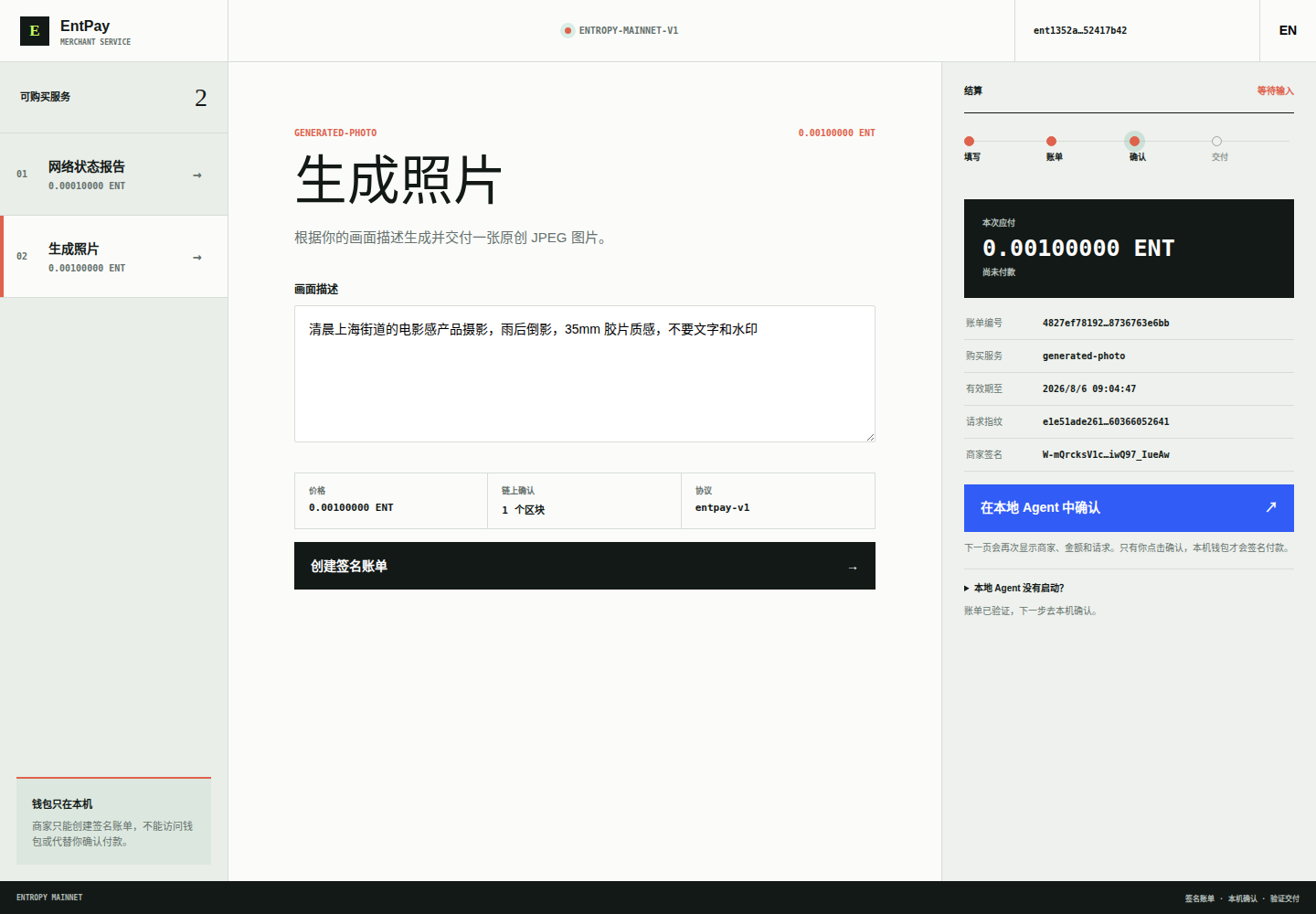
用户在商家页面选择“生成照片”,填写:
清晨上海街道的电影感产品摄影,雨后倒影,35mm 胶片质感,不要文字和水印
点击“创建签名账单”以后,右侧会出现价格、账单编号、服务、有效期、请求哈希和商家签名。此时状态明确显示“尚未付款”,钱包没有签名,也没有广播交易。
用户如何完整使用?
1. 启动本机 Agent
Linux 用户从 v1.5.1 Release 下载 entpay-linux-amd64。因为 Entcoin 桌面程序和 Agent 使用同一个钱包目录,先退出 Entcoin 桌面程序,再运行:
chmod +x entpay-linux-amd64
./entpay-linux-amd64 agent-ui \
  --data /home/eric/.config/Entropy/mainnet-v1 \
  --wallet ent193efeb05b575d0f07384e6c0876722e959856d7f545b14a3 \
  --max-amount 0.01000000
Agent 只监听 127.0.0.1:47831,不是公网服务。建议使用独立、低余额的 Agent 钱包,并把 --max-amount 设为你真正愿意支付的单笔硬上限。
2. 在商家页面创建 Invoice
打开任一演示商家,选择服务、填写请求,然后点击“创建签名账单”。创建 Invoice 不会付款。中英文切换会保留输入和已经创建的账单。
3. 点击“在本地 Agent 中确认”
商家页面会打开 http://127.0.0.1:47831/。账单能力通过 URL fragment 交接;fragment 不进入 HTTP 请求,本机页面读取后立即从地址栏清除。
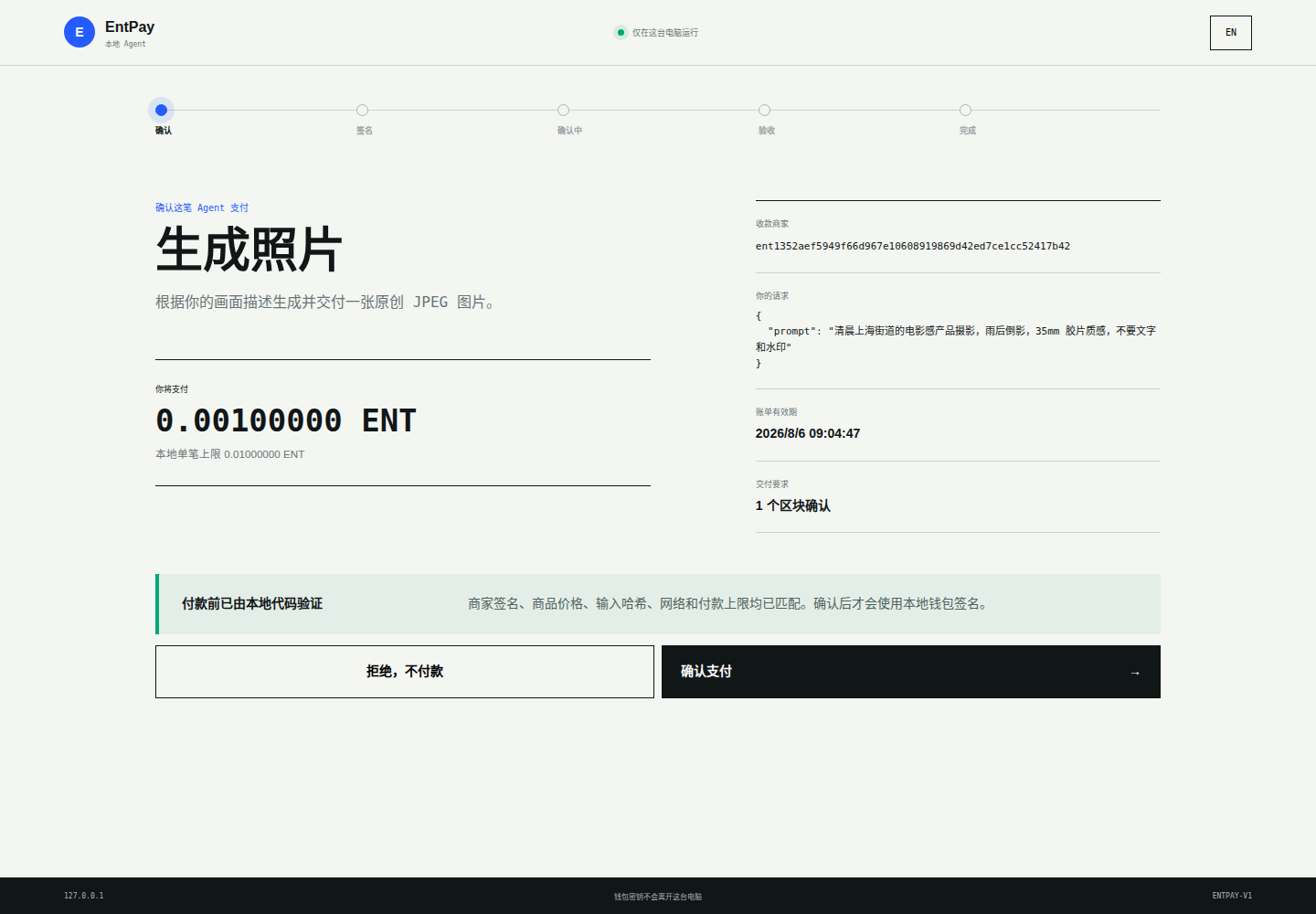
本机 Agent 会重新从商家读取商品信息,并用本地确定性代码检查:
- 协议和网络必须是
entpay-v1/entropy-mainnet-v1; - 商家地址、公钥与 Ed25519 Invoice 签名必须匹配;
- 商品、准确价格、原始输入哈希和确认数必须匹配;
- Invoice 不能过期;
- 金额不能超过本机
--max-amount。
确认页再次显示收款商家、完整请求、金额、账单有效期和链上确认要求。这里有两个明确动作:
- “拒绝,不付款”:立即停止,不创建交易;
- “确认支付”:此时本机钱包才签名并广播 ENT 交易。
4. 等待确认和交付
确认支付后,页面依次显示“本地签名 → 等待确认 → 验证交付 → 完成”。商家验证交易里唯一、准确的收款 output,达到要求的区块确认后才调用图片模型。Agent 随后验证签名 Receipt、交易 ID、输入、payload 和 JPEG hash,再把文件保存到本机。
最终页面会显示交易 ID、签名 Receipt 和本地文件路径。任何签名、金额、输入、确认或文件哈希不一致,流程都会停止并显示错误,不会把未验证结果伪装成成功。

商家如何构建和部署?
商家在自己的私有项目中实现公开的 entpay.Product 接口,声明商品 ID、价格、确认数和输入字段,并实现幂等履约。然后把 Product 注入 entpay.NewGateway。Gateway 负责签名 Invoice、SQLite 状态机、精确收款验证、重放保护、确认等待、Receipt 和授权文件下载。
商家服务可以只放在自己的电脑或服务器,也可以使用自己的 Private Git 仓库;它不需要进入 Entcoin GitHub。生产环境通过 systemd credentials 或同等机制注入收款地址、商家签名 key、验证节点 URL 和模型 credential。不要把这些信息写进源码、Git、日志或命令行历史。
用户通过商家的 HTTPS 页面或 /v1/info 发现商品,不需要商家把商品“发布进 Entcoin 节点”。Entcoin 提供支付标准,商家拥有商品和部署,用户拥有钱包和最后确认权。
本次生产验收
v1.5.1 在桌面与手机浏览器完成了官网、美国/亚洲商家、中英文切换、生成照片 Invoice 和公网商家到 loopback Agent 的真实交接。验收确认地址栏 fragment 已清除,跨站 API/确认/iframe/子资源仍被拒绝;最后使用“拒绝,不付款”结束测试,因此没有为截图创建主网交易。
此前 v1.4 的两笔生成照片主网实付仍可公开核对:美国交易 62a662e5ac9717cda90b46c0f052f27fb7216cb1dd069b72c871912b69326340,亚洲交易 1c26a100f3d4a8b14bfca445973523aa3a4ea07ad30e774c103eea4df86534c7。两笔 Receipt、JPEG 和逐原子账目均已验证。
EntPay v1.5.1: the complete Agent payment flow from merchant invoice to local approval
EntPay is not an Entcoin-operated store and it does not embed a model service into an Entcoin node. It is a general Agent-payment protocol and SDK. Every merchant owns and deploys its products independently; every user reviews the invoice and pays from a wallet on their own computer.
- Release: Entcoin v1.5.1
- US demo merchant: https://entcoin.xyz/entpay/
- Asia demo merchant: https://template-chat.xyz/entpay/
What is it?
An AI Agent may need to buy a temporary external capability: generate a product photograph, query node data, convert a file, run a computation, or call a paid API. EntPay turns discovery, exact pricing, user approval, on-chain payment, and verified delivery into one auditable flow.
A merchant may describe a product, validate input, sign an Invoice, verify an exact on-chain payment, deliver a result, and sign a Receipt. It cannot read the user's wallet, approve on the user's behalf, obtain a seed/private key, or bypass the local hard spending limit.
The final result is not merely “payment successful.” It is a set of independently checkable objects: Invoice + transaction ID + signed Receipt + payload + artifact hash.
Real scenario: buying a generated photograph
The demo merchant independently deploys a generated-photo product. Its backend submits the visual brief to an image model, validates the returned JPEG format, dimensions, and byte limit, and uses the stable Invoice ID to fulfill the order only once. The model endpoint/API key, merchant signing key, database, and generated files remain on the merchant server and outside the Entcoin repository.
After the user selects Generated photograph, enters a brief, and clicks “Create signed invoice,” the workspace shows the exact price, Invoice ID, service, expiry, request hash, and merchant signature. The state is explicitly “NOT PAID.” No wallet signature or transaction exists yet.
Complete user flow
1. Start the local Agent
Download entpay-linux-amd64 from the v1.5.1 Release. Exit the Entcoin desktop application first because it and the Agent use the same wallet directory, then run:
chmod +x entpay-linux-amd64
./entpay-linux-amd64 agent-ui \
  --data /home/eric/.config/Entropy/mainnet-v1 \
  --wallet ent193efeb05b575d0f07384e6c0876722e959856d7f545b14a3 \
  --max-amount 0.01000000
The Agent listens only on 127.0.0.1:47831; it is not a public service. Use a separate low-balance Agent wallet and set a hard per-payment limit you are genuinely willing to spend.
2. Create the Invoice on the merchant page
Open either demo merchant, choose a service, enter the request, and click “Create signed invoice.” Creating an Invoice does not pay. Switching between Chinese and English preserves both the request and the Invoice.
3. Click “Confirm in local Agent”
The merchant opens http://127.0.0.1:47831/. The capability is handed over in a URL fragment, which is not sent in HTTP requests and is immediately removed from the address bar.
The local Agent fetches fresh merchant metadata and deterministically verifies the protocol/network, merchant key and Ed25519 signature, product, exact price, original input hash, confirmation count, expiry, and the local --max-amount limit.
The approval page shows the merchant, full request, amount, expiry, and confirmation requirement again. “Reject without paying” stops without creating a transaction. Only “Confirm payment” allows the local wallet to sign and broadcast ENT.
4. Wait for confirmation and delivery
After approval, the page progresses through Local signing, Confirming, Verifying, and Complete. The merchant verifies one unique, exact payment output and waits for the required blocks before fulfillment. The Agent then verifies the signed Receipt, transaction ID, input, payload, and JPEG hash before saving the file locally.
The result page exposes the transaction ID, signed Receipt, and local path. Any mismatch in signature, price, input, confirmation, or artifact hash stops the flow instead of presenting an unverified result as success.
How does a merchant build and deploy a product?
The merchant implements the public entpay.Product interface in its own private project, declares the product ID, price, confirmations, and input schema, and provides idempotent fulfillment. The Product is injected into entpay.NewGateway; the Gateway owns signed Invoices, the SQLite state machine, exact-output verification, replay protection, confirmation waiting, signed Receipts, and authorized artifact downloads.
The service may live only on the merchant's laptop or server, or in the merchant's own Private Git repository. It does not belong in the Entcoin GitHub repository. Production receiving addresses, signing keys, validation-node URLs, and model credentials should be injected with systemd credentials or an equivalent secret manager, never committed to source, Git, logs, or shell history.
Users discover products through the merchant's HTTPS page or /v1/info; products are not “published into an Entcoin node.” Entcoin provides the payment standard, the merchant owns the product and infrastructure, and the user retains the wallet and final approval.
Production acceptance
The v1.5.1 acceptance run covered the website, both regional merchants, bilingual state preservation, generated-photo Invoices, desktop/mobile layouts, and a real public-merchant-to-loopback handoff. The URL fragment was cleared and cross-site APIs, approvals, iframes, and subresources remained blocked. The test ended with Reject without paying, so no mainnet transaction was created for screenshots.
The two earlier v1.4 generated-photo mainnet purchases remain publicly verifiable: US transaction 62a662e5ac9717cda90b46c0f052f27fb7216cb1dd069b72c871912b69326340 and Asia transaction 1c26a100f3d4a8b14bfca445973523aa3a4ea07ad30e774c103eea4df86534c7. Both signed Receipts, JPEGs, and atom-level accounting were verified.